If your application still runs on the .NET Framework or ASP.NET MVC, an ASP.NET to .NET Core migration is no longer a “someday” project — it is how you keep the app fast, cross-platform, cloud-ready, and supportable. But a .NET migration without a plan is exactly how teams lose data, blow timelines, and break things in production. This guide gives you the full picture before you commit: what .NET migration actually involves, the methods to choose from, a step-by-step process, and a complete checklist you can work against. It is written for CTOs, architects, and engineering leads who want to make an informed decision — not a sales pitch.
What is .NET migration?
.NET migration is the process of moving an application from the legacy, Windows-only .NET Framework (including ASP.NET Web Forms and ASP.NET MVC) to modern .NET — the open-source, cross-platform runtime that began as .NET Core and is now released as .NET 6/8/9+. In practice, most enterprise projects are a .NET Framework to .NET Core migration: rebuilding configuration, dependency injection, routing, views, authentication, and data access on the new framework while preserving business logic and data.
It is not a simple version upgrade. The hosting model, project structure, configuration system, and middleware pipeline all change — which is why a repeatable methodology and a checklist matter.
Why migrate to .NET Core (modern .NET)?
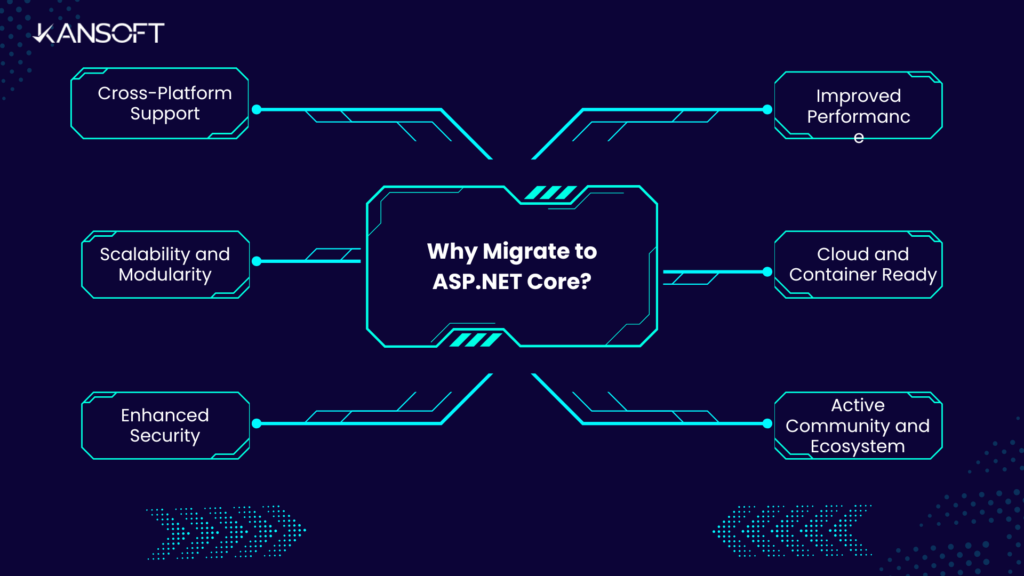
Modern .NET is a high-performance, open-source framework for cloud-ready, internet-connected applications. Compared with the legacy framework, it delivers:
- Cross-platform compatibility — run on Windows, Linux, and macOS, unlocking cheaper hosting and wider deployment options.
- Higher performance — significantly faster than ASP.NET MVC on the .NET Framework, which matters for high-traffic applications.
- Modern, modular architecture — built-in dependency injection, middleware, and better routing; lightweight, with a smaller memory footprint.
- Open-source and community-driven — frequent updates via GitHub instead of being tied to .NET Framework release cycles.
- Cloud-native by default — a first-class fit with Azure and containers, ideal for a cloud-first strategy.
- Long-term support — the .NET Framework is in maintenance mode; modern .NET is where new features and security updates land.
In short, an ASP.NET to .NET Core migration is less a technical upgrade than a strategic investment in scalability and long-term support.
ASP.NET MVC vs ASP.NET Core: key differences
Understanding what changes is half the planning. These are the differences that shape your migration effort:
| Feature | ASP.NET MVC | ASP.NET Core |
|---|---|---|
| Platform | Windows-only (.NET Framework) | Cross-platform (Windows, Linux, macOS) |
| Performance | Slower | Much faster, optimized for high load |
| Dependency injection | Built-in but optional | Native, first-class DI |
| Configuration | Web.config | appsettings.json (flexible, environment-aware) |
| Hosting | IIS-only | Kestrel, IIS, Nginx, Apache |
| Middleware | Limited | Full middleware pipeline |
| Updates | Tied to the .NET Framework | Frequent, open-source via GitHub |
| Modularity | Larger memory footprint | Highly modular, minimal footprint |
Choosing your .NET migration approach
There is no single “right” way to migrate — there is the right way for your app’s size, risk tolerance, and timeline. Most .NET migrations follow one of three approaches:
- Rehost (lift-and-shift): Move the app with minimal code change. Fastest, but you carry forward legacy debt — best for low-complexity apps or as a stopgap.
- Refactor: Rebuild the framework-specific pieces (config, DI, routing, auth) on modern .NET while keeping the architecture. The most common path for ASP.NET MVC apps.
- Re-architect: Break a monolith into modular services or APIs as you migrate. Highest effort, highest long-term payoff — for apps you will invest in for years.
You also choose a cutover style:
- Big-bang: Migrate everything, then switch over once. Simpler to reason about, riskier for large apps.
- Incremental (Strangler Fig): Stand the new app alongside the old and migrate module by module, routing traffic gradually. Safer for large, always-on systems — and the approach we recommend for most enterprise workloads.
Let our AI-led model (Kanetic-x) handle the hard work for you.
Explore how our migration expert model solves your dotnet migration problem.
The .NET migration process, step by step
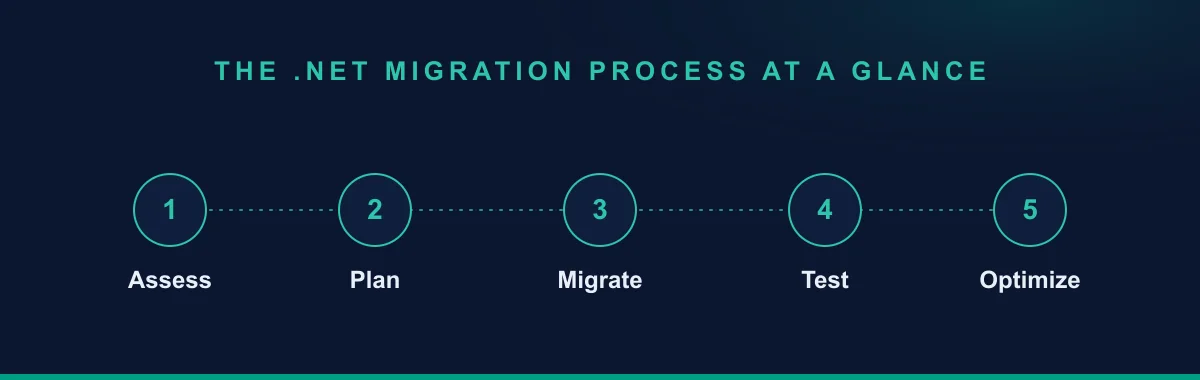
This is the dot net migration process from assessment to go-live, combining the framework migration with the data-safety steps that protect you in production.
Step 1 — Assess and audit
Inventory your application: dependencies, third-party libraries, data volumes, integrations, and pain points. Flag libraries that are not compatible with modern .NET and plan replacements early.
Step 2 — Back up everything
Before touching anything, back up all databases, configurations, and files. Validate the backups for completeness — this is your safety net.
Step 3 — Create the new ASP.NET Core project
Create a new ASP.NET Core Web Application in Visual Studio or VS Code as the base for your migration.
Step 4 — Migrate the project structure
- Replace
Web.configwithappsettings.json. - Configure the app and services in
Program.cs. - Replace
Global.asaxwithStartup.csfor middleware and services.
Step 5 — Migrate dependencies (DI)
Move to constructor injection using the built-in container:
public void ConfigureServices(IServiceCollection services)
{
    services.AddMvc();
    // Register your services, e.g.:
    services.AddSingleton<IProductService, ProductService>();
}
Step 6 — Migrate routes and controllers
Adopt attribute routing:
[Route("api/[controller]")]
public class ProductController : ControllerBase
{
    [HttpGet]
    public IEnumerable<Product> GetAll()
    {
        return _productService.GetAllProducts();
    }
}
Step 7 — Migrate views (Razor)
Move views into the Views folder and update layouts and partials to Razor in ASP.NET Core.
Step 8 — Migrate authentication & authorization
Re-implement Forms or Windows Authentication using ASP.NET Core Identity or external providers (OAuth, JWT, OpenID Connect).
Step 9 — Migrate data with integrity, then test
- Audit and cleanse data first — remove deprecated tables, fix schema inconsistencies, and standardize formats.
- Use a staging environment to validate data, functionality, and performance before go-live.
- For zero-downtime cutovers, run sync scripts to keep the legacy and new databases aligned during a gradual switchover.
- Automate testing — unit, integration, and regression tests (Postman for APIs, xUnit for units) to confirm there are no data or behavior discrepancies.
Post-migration: performance & scalability best practices
Migrating is step one; configuring modern .NET to actually outperform the old stack is step two:
- Use async/await for I/O-bound work to free threads and handle more concurrent requests.
- Trim the middleware pipeline — every component adds overhead.
- Cache strategically — in-memory or distributed (Redis) to take load off the database.
- Run Kestrel behind a reverse proxy (Nginx or IIS) for security and performance.
- Use database connection pooling to cut latency at scale.
- Enable response compression (built in) to shrink payloads and speed up load times.
Common .NET migration pitfalls to avoid
- Ignoring legacy dependencies — some .NET Framework libraries have no modern .NET equivalent; find upgrade paths before you start.
- Skipping modularization — lifting a monolith as-is wastes the migration; decompose where it is sensible.
- Overlooking the new security model — re-verify every authentication and authorization flow.
- Skipping load testing — validate performance under realistic load before cutover.
If you would rather not run a high-stakes migration alone, Kansoft’s .NET migration service — part of our broader legacy application modernization practice — covers the full path from audit to an optimized, production-ready .NET application.
Your .NET migration checklist
A condensed dot net migration checklist you can work against:
- Full application, dependency, and data audit completed
- Incompatible libraries identified with replacement paths
- Migration approach chosen (rehost / refactor / re-architect)
- Cutover style chosen (big-bang vs incremental / Strangler Fig)
- Complete, validated backups of databases, config, and files
- New ASP.NET Core project and structure (
appsettings.json,Program.cs,Startup.cs) - Dependencies moved to built-in DI
- Routes and controllers migrated to attribute routing
- Views migrated to Razor
- Authentication re-implemented (Identity / OAuth / JWT / OpenID Connect)
- Data audited, cleansed, and migrated in staging first
- Sync scripts ready for zero-downtime cutover (if required)
- Automated unit, integration, and regression tests passing
- Performance tuned (async, caching, compression, pooling)
- Load-tested under realistic traffic before go-live
Want to discuss your legacy migration requirements?
Talk to our migration expert today.